Topics, partitions, consumer groups, offsets, and durable event backbones
Kafka is frequently introduced as a message queue. That description is useful, but incomplete.
A better mental model is:
Kafka is a distributed, replicated, append-only log in which producers write records and consumers independently track their position.
Unlike a traditional queue, reading a record does not immediately remove it. Kafka retains records according to the topic’s retention policy, allowing multiple consumer groups to process the same history independently or replay earlier records.
Kafka’s core mental model
A Kafka-based system normally contains:
- Producers
- Topics
- Partitions
- Brokers
- Consumer groups
- Offsets
The basic flow is:
Producer
   ↓
Topic partition
   ↓
Consumer group
However, several independent consumer groups can read the same topic.
For example, the same Order Created record may be processed by:
- Fulfilment
- Fraud detection
- Analytics
- Customer notifications
- Search indexing
Each consumer group maintains its own progress.
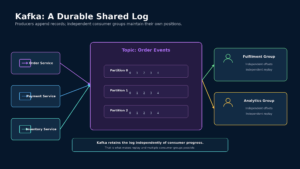
Figure 1: Producers append records to a durable topic, while independent consumer groups maintain separate offsets.
Kafka does not delete a record merely because one consumer has processed it. The record remains available until retention or compaction removes it. This is what makes replay, backfills, and independent consumption possible.
Producers
A producer creates records and sends them to Kafka.
A record normally contains:
Topic
Key
Value
Timestamp
Headers
After Kafka accepts it, the record is assigned:
Partition
Offset
Example event:
{
  "eventId": "evt-8821",
  "eventType": "OrderCreated",
  "orderId": "order-9014",
  "customerId": "customer-221",
  "amount": 4250,
  "currency": "INR",
  "occurredAt": "2026-07-31T10:30:00Z"
}
The producer should publish stable business facts rather than expose its internal database representation.
Prefer:
Order Created
Payment Authorized
Inventory Reserved
Avoid:
Order Table Row Updated
Payment Status Column Changed
The first set expresses business meaning. The second leaks implementation details.
Topics
A topic is a named stream of records.
Examples:
orders.events
payments.events
inventory.changes
customer-profile.events
A topic should normally represent a stable domain stream rather than one specific consumer.
Good:
payments.eventsRisky:
notification-service-inputThe second name couples the producer to today’s consumer. If the notification service changes, the topic design may no longer make sense.
Consumer-specific work topics can still be appropriate when the semantics are explicitly task-oriented, but domain events should usually be named after the facts they represent.
Partitions
A Kafka topic is divided into one or more partitions.
Each partition is an ordered append-only log.
Partition 0

Offset 0
Offset 1
Offset 2
Offset 3
A topic with three partitions may look like:
Partition 0: 0 → 1 → 2 → 3
Partition 1: 0 → 1 → 2
Partition 2: 0 → 1 → 2 → 3 → 4
Kafka guarantees ordering within a partition. It does not provide one global ordering across every partition in a topic.
Partitions provide:
- Parallel producer throughput
- Parallel consumer processing
- Horizontal storage distribution
- A defined ordering boundary
- Failure isolation across partition replicas
Increasing the number of partitions can increase possible parallelism, but it also introduces more metadata, replication traffic, open files, assignment work, and rebalance activity.
Partition count should therefore be treated as an architectural decision rather than an arbitrary large number.
Keys and ordering
A producer can attach a key to each record.
The key is commonly used to determine which partition receives the record.
For example:
Key: order-9014All records for that order can be routed to the same partition:
Order Created
Inventory Reserved
Payment Authorized
Order Shipped
This preserves order for that business entity.
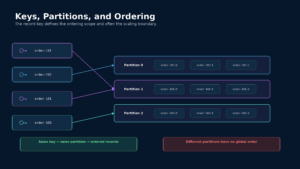
Figure 2: Records with the same key are routed to the same partition, preserving order for that key.
A useful key may be:
- Order ID
- Account ID
- Customer ID
- Payment ID
- Device ID
- Merchant ID
The correct key depends on the ordering requirement.
Example: order events
Using orderId as the key ensures that events for one order remain ordered.
order-101 → Partition 1
order-202 → Partition 0
order-101 → Partition 1
Example: account ledger events
Using accountId can ensure that ledger changes for one account are processed sequentially.
The hot-partition problem
A poor key may send too much traffic to one partition.
Examples:
- One global tenant ID
- One very large merchant
- One celebrity account
- A constant default key
- Missing keys routed to the same partition
A hot partition limits throughput even when the rest of the topic has unused capacity.
Possible mitigations include:
- Choose a more granular key
- Isolate exceptionally large tenants
- Split workloads when ordering permits
- Aggregate before producing
- Accept serialization when correctness requires it
Do not randomly distribute records when the application requires per-key ordering.
Brokers and clusters
A Kafka cluster contains one or more brokers.
Each broker stores partitions and serves producer and consumer requests.
For a replicated partition, one broker acts as the leader and other brokers hold follower replicas.
Partition 0

Broker 1: Leader
Broker 2: Follower
Broker 3: Follower
Producers and consumers interact with the partition leader. Followers replicate the leader’s log.
If the leader becomes unavailable, an eligible replica can take over according to the cluster’s replication and election rules.
Replication factor alone does not define durability. Durability also depends on:
- Producer acknowledgement mode
- In-sync replicas
- Minimum in-sync replica configuration
- Replica health
- Leader election policy
- Disk reliability
- Operational procedures
Consumer groups
Consumers sharing the same group identifier cooperate as one logical consumer.
Kafka distributes topic partitions among the consumers in that group.
Suppose a topic has three partitions:
Partition 0
Partition 1
Partition 2
A group containing three consumers can assign:
Consumer A → Partition 0
Consumer B → Partition 1
Consumer C → Partition 2
Within one conventional consumer group, each partition is assigned to one consumer at a time. This assignment allows parallel processing without two consumers in the same group simultaneously processing the same partition.
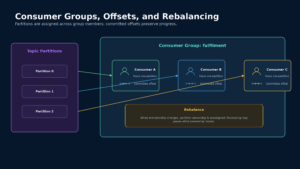
Figure 3: A consumer group distributes partition ownership while committed offsets preserve progress.
More consumers than partitions
If a topic has three partitions and the consumer group has four consumers:
Consumer A → Partition 0
Consumer B → Partition 1
Consumer C → Partition 2
Consumer D → Idle
The fourth consumer cannot increase parallelism until more partitions exist.
Partition count therefore sets the upper bound on parallelism for a conventional consumer group.
Independent consumer groups
Different groups consume the same topic independently.
Example:
Fulfilment Group
Fraud Group
Analytics Group
Notification Group
Each group has:
- Its own partition assignments
- Its own offsets
- Its own processing speed
- Its own retry behaviour
- Its own replay position
One slow analytics consumer does not directly change the fulfilment group’s offset.
Offsets
An offset identifies a record’s position within one partition.
Partition 2
Offset 17421
Offsets are local to a partition.
This means:
Partition 0, Offset 100and:
Partition 1, Offset 100refer to different records.
A consumer tracks its current position and can commit offsets so that processing can resume after a restart. Kafka stores committed offsets for consumer groups and uses them to restore progress.
Current position versus committed position
The current position is where the running consumer has read.
The committed position is the durable recovery checkpoint.
These may differ while records are being processed.
When should offsets be committed?
Offset timing affects delivery semantics.
Commit before processing
Read record
Commit offset
Process record
If the process crashes after committing but before completing the work, that work may be lost.
This approximates at-most-once processing.
Process before committing
Read record
Process record
Commit offset
If the process completes the work but crashes before committing, the record may be processed again after restart.
This provides at-least-once processing.
Most business applications choose at-least-once processing and make downstream effects idempotent.
Rebalancing
A rebalance occurs when Kafka changes partition ownership within a consumer group.
Common triggers include:
- A consumer joins
- A consumer leaves
- A consumer crashes
- Topic partitions change
- Group membership changes
During a rebalance:
- Existing assignments may be revoked
- Partitions are reassigned
- Processing may pause
- In-flight work must be completed or safely abandoned
- New consumers resume from committed offsets
Current Kafka versions also support the newer consumer rebalance protocol, introduced as generally available from Kafka 4.0, with a more incremental design intended to reduce rebalance disruption.
Regardless of protocol, applications should monitor:
- Rebalance frequency
- Rebalance duration
- Consumer restarts
- Partition movement
- Processing pauses
Frequent rebalances may indicate unstable consumers, overly long processing, deployment churn, or unsuitable timeout settings.
Replication and durability
Kafka replicates partitions across brokers to protect against broker failure.
A partition may have:
Replication factor: 3

Broker 1: Leader
Broker 2: Follower
Broker 3: Follower
The producer’s acknowledgement configuration determines how much confirmation it waits for before considering a write successful.
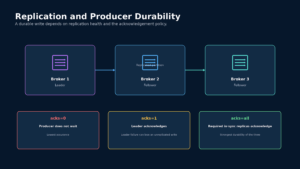
Figure 4: Producer acknowledgement modes provide different latency and durability trade-offs.
acks=0
The producer does not wait for a broker acknowledgement.
Benefits:
- Lowest acknowledgement latency
Risks:
- The producer may not know whether Kafka accepted the record
- Records may be lost without an application-visible error
Use only when losing data is acceptable.
acks=1
The partition leader acknowledges after accepting the write.
Benefits:
- Lower latency than waiting for replicas
Risk:
- The leader may fail before followers replicate the acknowledged record
acks=all
The leader waits for the required in-sync replicas before acknowledging.
Benefits:
- Stronger durability
Costs:
- Higher acknowledgement latency
- Reduced write availability when insufficient replicas are in sync
A common production durability configuration uses replication together with acks=all and an appropriate min.insync.replicas value. Apache Kafka’s broker documentation gives the example of replication factor three, minimum in-sync replicas two, and producer acknowledgements set to all.
In-sync replicas
An in-sync replica is sufficiently caught up with the partition leader according to Kafka’s replica-management rules.
The in-sync replica set matters because acks=all does not necessarily mean every configured replica. It means the write must satisfy the required in-sync replica policy.
If too few replicas remain available:
- Writes may be rejected
- The system protects durability by reducing availability
- Operators must restore broker or replica health
This is a deliberate consistency and availability trade-off.
Idempotent producers
A producer may retry a send after a network failure without knowing whether the first attempt succeeded.
Without protection, that retry could append a duplicate record.
Kafka supports idempotent producer behaviour that allows the broker to detect retry duplicates for the relevant producer and partition sequence.
Idempotent production protects records written to Kafka.
It does not automatically make an external business operation idempotent.
For example:
Consume Payment Authorized
      ↓
Call fulfilment database
      ↓
Commit Kafka offset
The database write still needs its own idempotency or atomic coordination.
Delivery semantics
Kafka discussions commonly use three delivery categories.
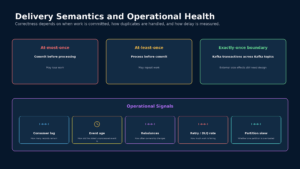
At-most-once
Records may be lost but are not deliberately processed again.
Typical approach:
Commit offset
Process record
At-least-once
Records should not be lost, but may be processed more than once.
Typical approach:
Process record
Commit offset
Consumers must make business effects idempotent.
Exactly-once
Kafka supports transactional processing that can atomically combine writes to Kafka topics with consumer-offset updates. Kafka Streams uses these capabilities for exactly-once processing within its Kafka-integrated processing boundary.
The boundary matters.
Kafka transactions can coordinate:
Read from Kafka
Process
Write to Kafka
Commit consumed offsets
They do not automatically make arbitrary external operations transactional.
Examples requiring additional design:
- Writing to a relational database
- Calling a payment provider
- Sending an email
- Updating an external search service
- Invoking a third-party API
For those effects, use patterns such as:
- Idempotent operations
- Transactional inbox
- Transactional outbox
- Database constraints
- Operation identifiers
- Reconciliation
Retention
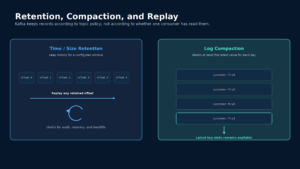
Kafka retains records independently of whether consumers have read them.
Retention may be based on:
- Time
- Log size
- Compaction policy
- A combination of policies
Example:
Retain order events for seven daysA consumer can replay any offset that is still retained.
This supports:
- Recovery
- Backfills
- New consumer groups
- Rebuilding projections
- Auditing
- Debugging
- Reprocessing after defects
Retention is not archiving
Kafka retention should not automatically be treated as permanent archival storage.
Long-term regulatory or analytical retention may require:
- Object storage
- Data lake storage
- Warehouse ingestion
- Compliance archives
- Backup and restore procedures
Log compaction
Log compaction retains at least the latest value associated with each key, subject to Kafka’s compaction process.
Example records:
customer-7 → version 1
customer-7 → version 2
customer-9 → version 1
customer-7 → version 3
After older values are compacted, the topic retains the latest known value for each key:
customer-7 → version 3
customer-9 → version 1
Compacted topics are useful for:
- Current customer profiles
- Configuration
- Reference data
- Entity state
- Cache reconstruction
- Table-style streams
A tombstone record, typically a key with a null value, can represent deletion.
Compaction is asynchronous. Consumers may observe multiple historical versions before the broker removes older segments.
Replay
A consumer can reset its position and reprocess retained records.
Replay is useful when:
- A projection contains a bug
- A downstream database must be rebuilt
- A new feature needs historical data
- A security rule must be reapplied
- An incident requires reconstruction
- A consumer missed processing during an outage
Replay must be designed safely.
Questions to ask:
- Are consumer operations idempotent?
- Can old events still be interpreted?
- Are event schemas backward compatible?
- Could replay trigger customer notifications again?
- Could replay recreate financial effects?
- Is the destination empty or being updated in place?
- How will progress be monitored?
- Can replay overwhelm downstream systems?
A replay button without guardrails is an operational risk.
Schema design and evolution
Kafka records often outlive the producer version that created them.
A good event contract should include:
Event ID
Event type
Schema version
Business key
Occurred time
Producer
Correlation ID
Causation ID
Payload
Prefer additive evolution:
Add an optional fieldAvoid abrupt breaking changes:
Rename or reinterpret an existing fieldUseful practices include:
- Schema registry
- Compatibility checks
- Consumer-driven tests
- Versioned events when necessary
- Clear field semantics
- Deprecation windows
- Data classification
Do not rely only on JSON being syntactically valid. Semantic compatibility matters.
Consumer lag
Consumer lag is the difference between the latest available offset and a consumer group’s progress.
Conceptually:
Log end offset: 10,000
Committed offset: 9,200
Lag: 800 records
Kafka tooling exposes current offset, log-end offset, and lag for consumer groups.
Lag is important, but record count alone is not enough.
Eight hundred records may represent:
- A few milliseconds of traffic
- Several hours of expensive processing
- One very large batch
- One overloaded partition
Also track:
- Event age
- Oldest unprocessed record
- Processing throughput
- Partition-level lag
- Retry volume
- Rebalance duration
- Downstream latency
Delivery semantics and operational health
The most useful operational question is not always:
How many records behind is the consumer?
It may be:
How old is the oldest business event that has not completed processing?
For a payment system, 500 records of lag may be less important than one payment event waiting for 20 minutes.
Backpressure
Kafka decouples producers and consumers in time.
If producers temporarily publish faster than consumers can process, Kafka retains the backlog.
This absorbs bursts, but capacity is not unlimited.
If consumers remain slower than producers:
- Lag grows
- Disk usage increases
- Retention may expire before processing catches up
- Replays become longer
- Downstream systems may receive a catch-up surge
- Old business actions may no longer be valid
Possible controls include:
- Consumer autoscaling
- Bounded concurrency
- Batch-size tuning
- Pause and resume
- Rate limiting
- Load shedding
- Downstream bulkheads
- Priority topics
- Capacity planning
Failure handling
A consumer should classify failures rather than retry every error forever.
Transient technical failure
Examples:
- Temporary database outage
- Network timeout
- Rate limit
- Dependency unavailable
Response:
- Retry with bounded exponential backoff
- Add jitter
- Preserve ordering requirements
- Stop after a defined budget
Permanent technical failure
Examples:
- Invalid schema
- Missing required configuration
- Unsupported event version
- Corrupted payload
Response:
- Quarantine
- Alert the owning team
- Repair or transform the record
- Replay deliberately
Business rejection
Examples:
- Order already cancelled
- Payment cannot be refunded
- Account is blocked
- Inventory operation is no longer valid
Response:
- Record the domain outcome
- Do not retry forever
- Publish a rejection event where appropriate
Poison records
One record may repeatedly block progress for its partition.
Possible approaches include:
- Parking-lot topic
- Dead-letter topic
- Controlled skip policy
- Manual correction
- Side-channel retry
A dead-letter topic needs:
- Ownership
- Retention
- Alerting
- Security controls
- Repair instructions
- Replay tooling
Without those controls, it becomes a hidden graveyard.
Ordering versus retry
Partition ordering creates a difficult failure decision.
Suppose:
Offset 100 fails
Offset 101 is valid
Offset 102 is valid
Options include:
Block the partition
Preserves strict order but delays all later records.
Retry asynchronously
Improves throughput but may change observable order.
Move the failed record aside
Allows progress but may violate business dependencies.
Stop and escalate
Appropriate for high-value financial or ledger events.
The correct choice depends on the domain.
For account-ledger updates, strict ordering may be essential.
For analytics events, processing a later event first may be acceptable.
Observability
Monitor the Kafka platform itself:
- Broker availability
- Offline partitions
- Under-replicated partitions
- In-sync replica changes
- Produce latency
- Fetch latency
- Disk usage
- Network saturation
- Controller health
Monitor consumer behaviour:
- Consumer lag
- Event age
- Rebalance rate
- Retry rate
- Dead-letter volume
- Processing latency
- Partition skew
Monitor business completion:
- Orders published versus fulfilled
- Payments authorized versus recorded
- Events produced versus projections updated
- Inventory changes versus search-index updates
Kafka can be technically healthy while the business pipeline is broken.
When Kafka is a strong fit
Kafka is useful when the system needs:
- Durable event streams
- Multiple independent consumers
- Replay and backfill
- High-throughput event ingestion
- Stream processing
- Change-data capture
- Materialized views
- Event-driven integration
- Audit history within a defined retention window
Examples include:
- Order-event backbones
- Payment-event streams
- Customer-activity streams
- Telemetry pipelines
- Search-index updates
- Data-platform ingestion
- Fraud-feature pipelines
When a simpler queue may be better
A simpler queue may be preferable when:
- One consumer owns each task
- Replay is unnecessary
- Throughput is moderate
- Per-message acknowledgement is the primary need
- Tasks should disappear after completion
- Operational simplicity is more important
- The team does not need retained event history
Kafka should not be adopted merely because it is associated with high scale.
The system should benefit from Kafka’s defining properties:
- Durable logs
- Partitioned ordering
- Independent consumer positions
- Replay
- Replication
Key trade-offs
| Benefit | Cost |
|---|---|
| Durable shared event history | More operational infrastructure |
| Independent consumer groups | Schema and ownership governance |
| Partition-based scaling | Ordering is limited to partitions |
| Replay and backfill | Reprocessing must be safe |
| High-throughput ingestion | Partition and broker capacity planning |
| Replication and durability | Latency and availability trade-offs |
| Asynchronous decoupling | Eventual consistency |
| Stream-processing support | More complex failure handling |
Design review checklist
Before approving a Kafka design, ask:
- What is the business meaning of the topic?
- Is this an event stream or a work queue?
- What is the record key?
- What ordering scope is required?
- How many partitions are needed?
- Can one key create a hot partition?
- What replication and acknowledgement guarantees are required?
- When are consumer offsets committed?
- Are consumers idempotent?
- What is the retention period?
- Is log compaction appropriate?
- Can consumers safely replay?
- How are schemas evolved?
- How are poison records handled?
- What happens during rebalancing?
- Which metric represents business freshness?
Final perspective
Kafka is not valuable simply because it transfers records quickly.
Its architectural value comes from creating a durable, replicated timeline from which independent systems can build their own state.
That capability depends on several deliberate decisions:
- Topic ownership
- Record keys
- Partition count
- Ordering scope
- Replication
- Producer acknowledgements
- Offset management
- Replay safety
- Failure handling
- Observability
The strongest mental model is:
Producers append facts. Kafka preserves the ordered partition logs. Consumer groups independently decide how and when to process them.